If you’re looking to train your model using Retrieval-Based Voice Conversion (RVC) but don’t want to spend hours refining and editing audio files, you’re in the right place! In this tutorial, I’ll show you how to create a high-quality dataset file in just five minutes using an automated program.
This free tool will:
✅ Clean your audio files by removing noise and background music
✅ Eliminate silent moments for a smoother dataset
✅ Combine all audio clips into a single file, ready for training
Let’s get started!
Watch Youtube Video : Click Here
✅ Links used in this tutorial:
- RVC Dataset Maker GUI : Click Here
Step By Step Guide:
Step 1: Open Google Colab and Run the First Step

- Click on the Google Colab project link provided in the description.
- Press Run Anyway when prompted.
- Google Colab will start processing, and the first step will begin.
- This step installs the required program on Google Colab, which takes about 2 minutes.
- Once done, you’ll see a checkmark confirming completion.
Step 2: Launch the Program Interface

- Run Step 2 in Google Colab.
- A public URL will appear. Click on it to open the Gradio-powered program interface.
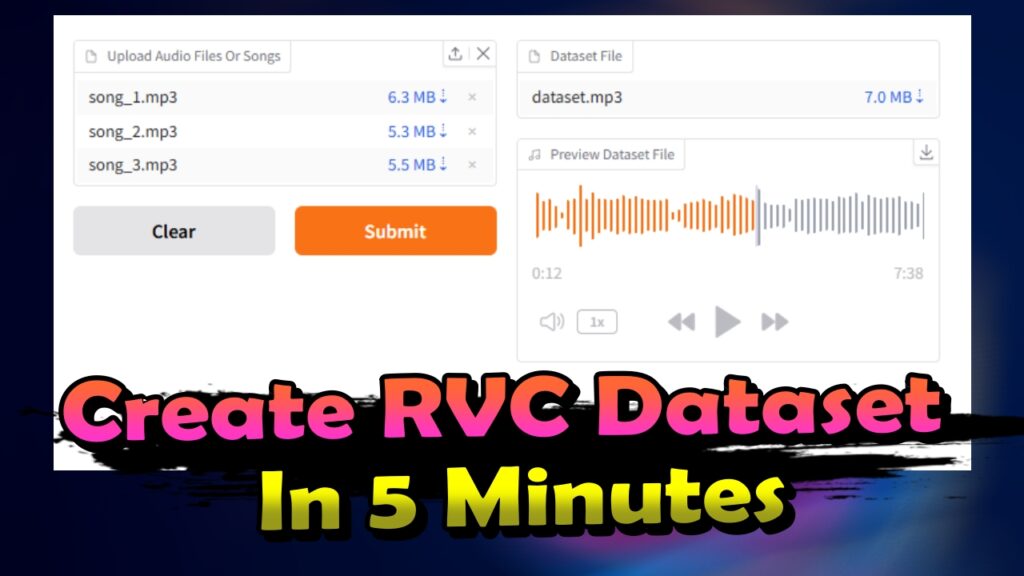
Step 3: Upload Your Audio Files

- Click Upload and select the files you want to process.
- You can use regular audio files or songs (e.g., MP3, WAV).
- After uploading, the files will appear in the interface.
Step 4: Process and Download the Dataset File

- Click Submit to start processing.
- Wait about 5 minutes while the program refines your audio.
- Once complete, a preview of the dataset file will appear.
- Download the final dataset file by clicking the download button or the small arrow.
- Save it to your device and use it to train your RVC model!
With this method, you can save hours of manual work and get a clean, optimized dataset file in just a few minutes. This tool is a game-changer for anyone working with RVC training.